Batch Image Uploader for Webflow Collections

Batch Image Uploader streamlines your content workflow by enabling bulk image uploads directly to Webflow CMS collections with automatic WebP or AVIF conversion. Upload entire galleries in seconds while the app intelligently resizes and optimizes images for modern web performance. Perfect for photographers, agencies, and anyone managing image-heavy portfolios, event galleries, or product catalogs without the tedious one-by-one upload process.

Choose your Collection
discover

Advanced WebP and AVIF conversions

Fine-tune compression settings

Select across multiple collections

Conveniently access the app from Webflow UI

Heading 1

Heading 2

Heading 3

Heading 4

Heading 5
Heading 6

Lorem ipsum dolor sit amet, consectetur adipiscing elit, sed do eiusmod tempor incididunt ut labore et dolore magna aliqua. Ut enim ad minim veniam, quis nostrud exercitation ullamco laboris nisi ut aliquip ex ea commodo consequat. Duis aute irure dolor in reprehenderit in voluptate velit esse cillum dolore eu fugiat nulla pariatur.

Block quote

Ordered list

  1. Item 1
  2. Item 2
  3. Item 3

Unordered list

  • Item A
  • Item B
  • Item C

Text link

Bold text

Emphasis

Superscript

Subscript

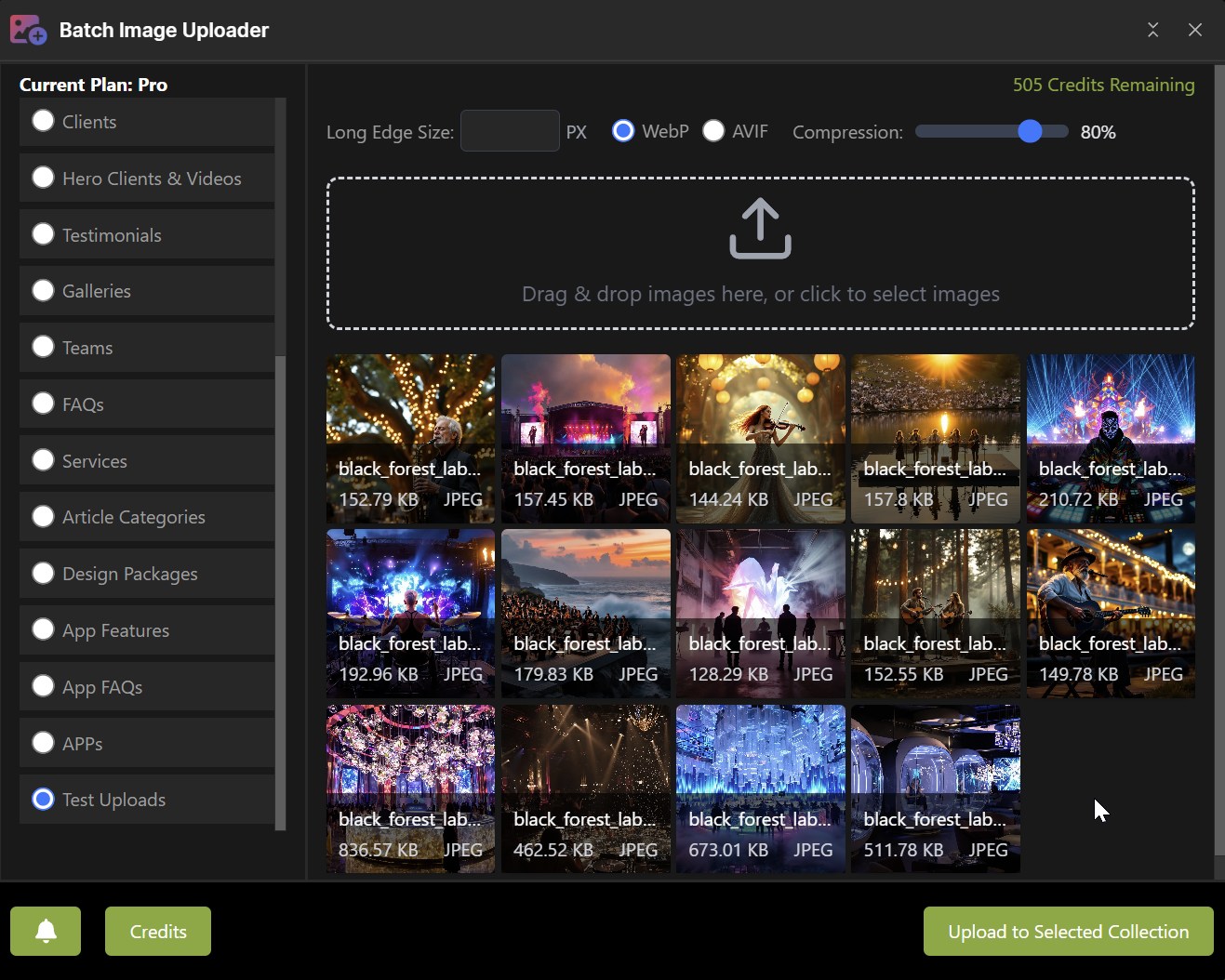
Choose your target collection from the sidebar and configure your upload settings. Set your maximum image size, select WebP or AVIF format, and adjust compression quality with the intuitive slider. The drag-and-drop interface makes it easy to select multiple images from your desktop, while the app intelligently detects available image fields in your chosen collection for seamless content management.
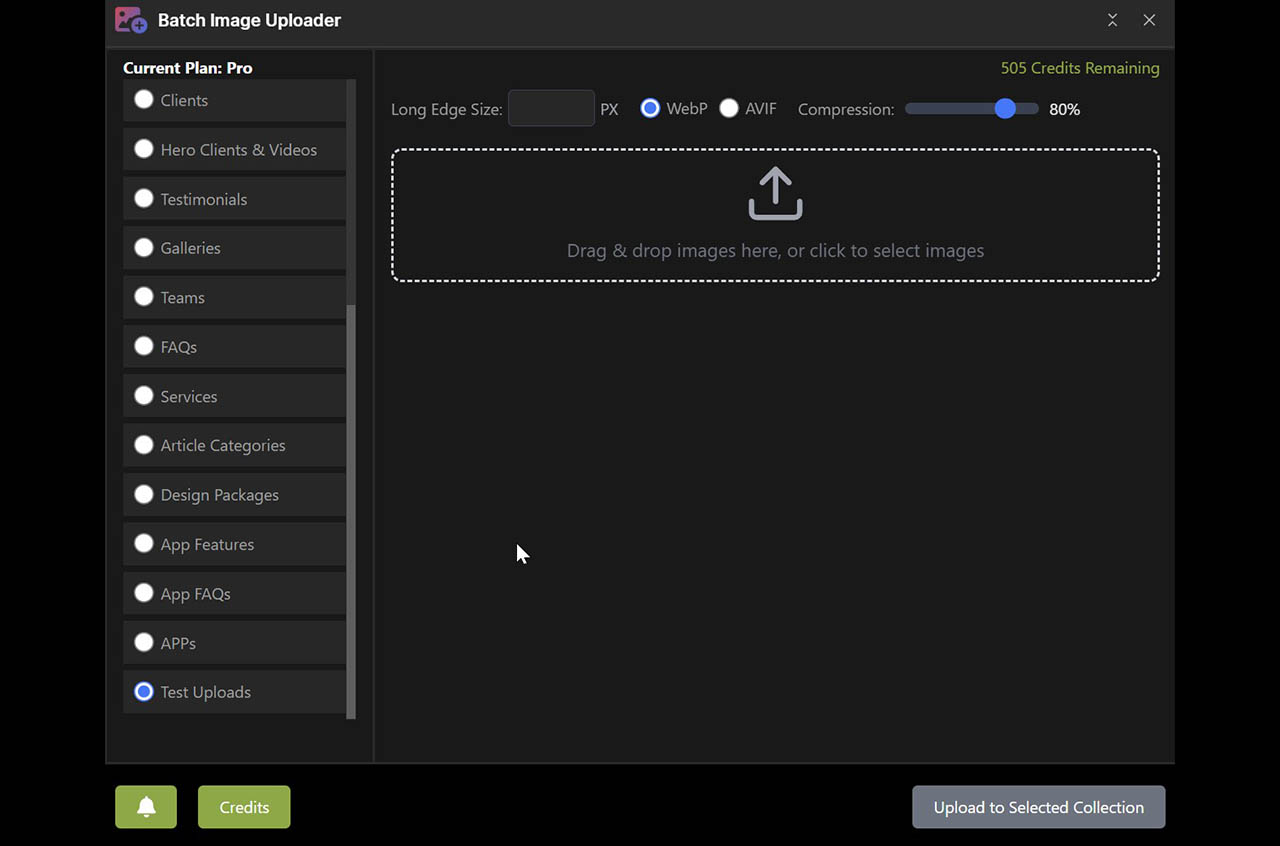
Drag-and-Drop or Browse Images
discover

Bulk upload dozens or hundreds of images

Preview thumbnails with file sizes and formats

Smart image resizing with aspect ratio preservation

Drag-and-drop or click to browse interface

Heading 1

Heading 2

Heading 3

Heading 4

Heading 5
Heading 6

Lorem ipsum dolor sit amet, consectetur adipiscing elit, sed do eiusmod tempor incididunt ut labore et dolore magna aliqua. Ut enim ad minim veniam, quis nostrud exercitation ullamco laboris nisi ut aliquip ex ea commodo consequat. Duis aute irure dolor in reprehenderit in voluptate velit esse cillum dolore eu fugiat nulla pariatur.

Block quote

Ordered list

  1. Item 1
  2. Item 2
  3. Item 3

Unordered list

  • Item A
  • Item B
  • Item C

Text link

Bold text

Emphasis

Superscript

Subscript

View all selected images with thumbnail previews showing original file names, sizes, and formats. The interface displays your entire batch at a glance, making it easy to verify your selection before processing. Configure your long-edge size to automatically scale all images proportionally, and toggle between WebP and AVIF formats. Adjust compression settings in real-time to find the perfect balance between quality and performance before uploading to your collection.
Choose your Image Upload Field
discover

Automatic detection of collection image fields

Select exact destination for your uploads

Support for multiple image fields per collection

Clear confirmation before processing begins

Heading 1

Heading 2

Heading 3

Heading 4

Heading 5
Heading 6

Lorem ipsum dolor sit amet, consectetur adipiscing elit, sed do eiusmod tempor incididunt ut labore et dolore magna aliqua. Ut enim ad minim veniam, quis nostrud exercitation ullamco laboris nisi ut aliquip ex ea commodo consequat. Duis aute irure dolor in reprehenderit in voluptate velit esse cillum dolore eu fugiat nulla pariatur.

Block quote

Ordered list

  1. Item 1
  2. Item 2
  3. Item 3

Unordered list

  • Item A
  • Item B
  • Item C

Text link

Bold text

Emphasis

Superscript

Subscript

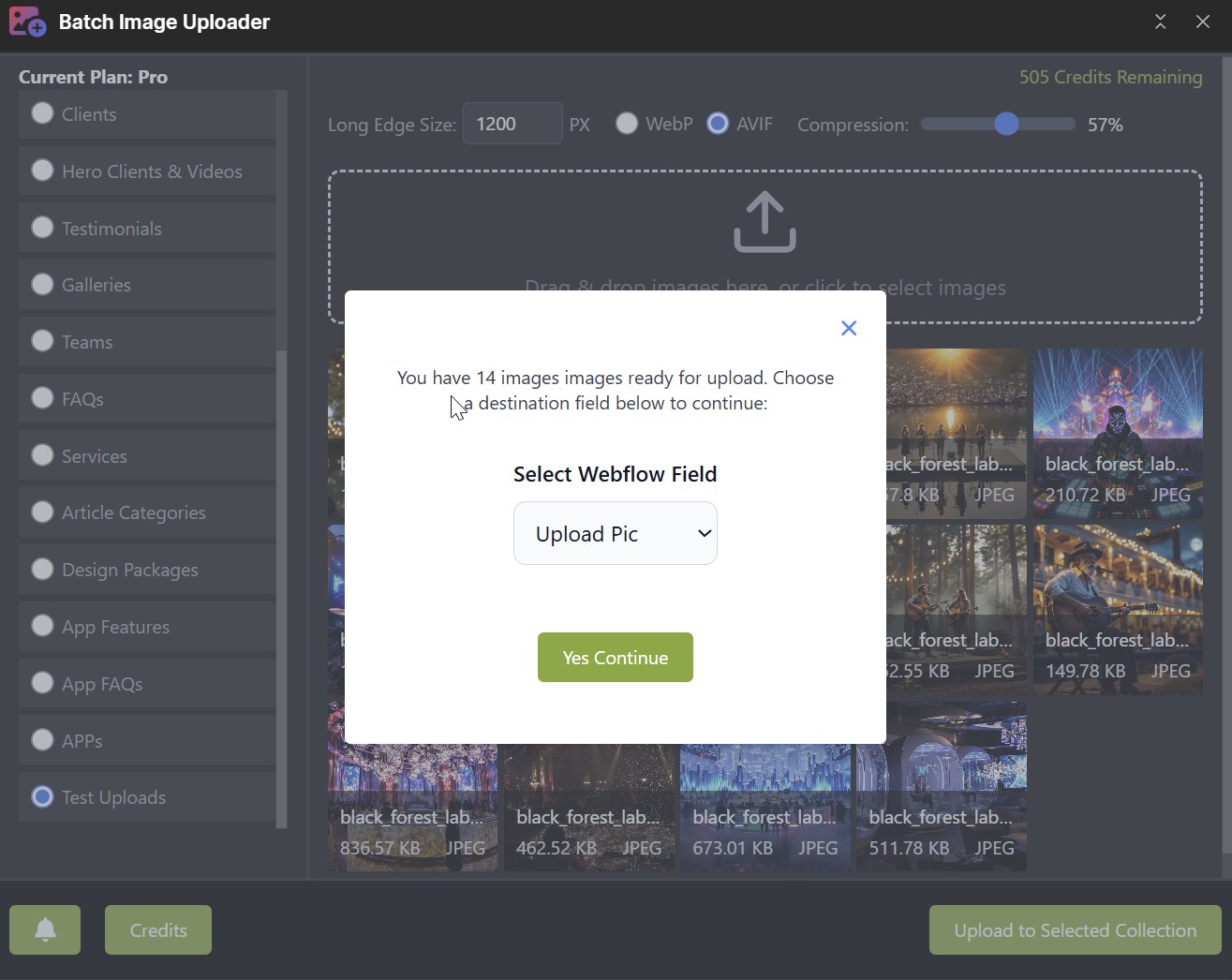
The app intelligently detects all available image fields in your selected collection and presents them in an easy-to-use dropdown menu. Simply choose where you want your batch of images uploaded, and the app handles the rest. This field mapping ensures your images land exactly where you need them, whether you're working with galleries, featured images, or any custom image field structure in your Webflow CMS.
Upload and Convert
discover

Real-time progress tracking and upload status

Background processing allows continued work

Automatic format conversion during upload

Estimated time remaining for batch completion

Heading 1

Heading 2

Heading 3

Heading 4

Heading 5
Heading 6

Lorem ipsum dolor sit amet, consectetur adipiscing elit, sed do eiusmod tempor incididunt ut labore et dolore magna aliqua. Ut enim ad minim veniam, quis nostrud exercitation ullamco laboris nisi ut aliquip ex ea commodo consequat. Duis aute irure dolor in reprehenderit in voluptate velit esse cillum dolore eu fugiat nulla pariatur.

Block quote

Ordered list

  1. Item 1
  2. Item 2
  3. Item 3

Unordered list

  • Item A
  • Item B
  • Item C

Text link

Bold text

Emphasis

Superscript

Subscript

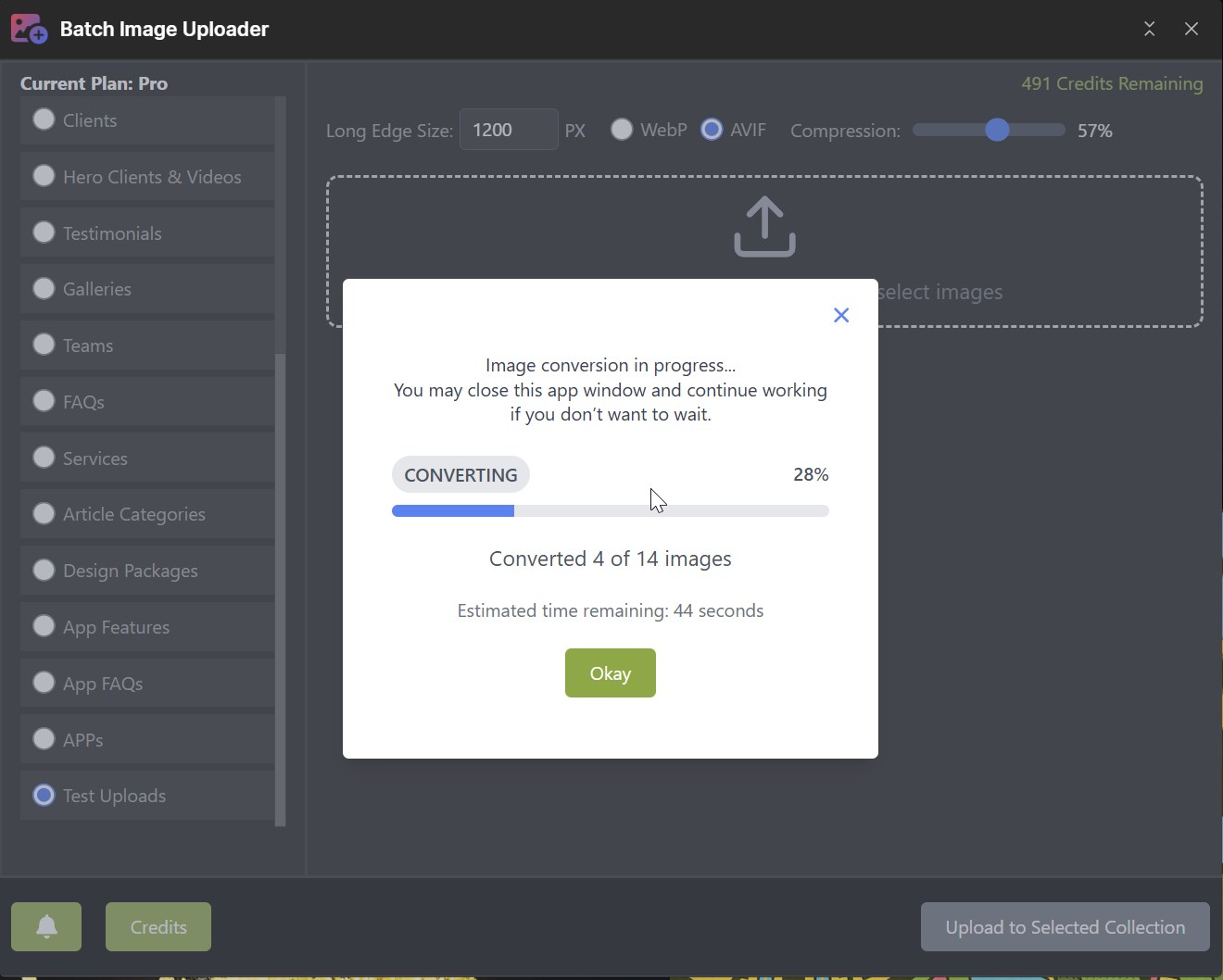
Watch your images convert and upload in real-time with a detailed progress indicator showing percentage complete, number of images processed, and estimated time remaining. The app performs format conversion and optimization simultaneously during upload, saving you valuable time. Close the app window and continue working in Webflow—processing continues in the background, and you'll receive an email notification once your entire batch is complete and ready in your collection.
Dynamic status notifications
discover

Receive email and in-app notifications

Complete upload history with timestamps

Track total images processed per batch

Review past uploads and success status

Heading 1

Heading 2

Heading 3

Heading 4

Heading 5
Heading 6

Lorem ipsum dolor sit amet, consectetur adipiscing elit, sed do eiusmod tempor incididunt ut labore et dolore magna aliqua. Ut enim ad minim veniam, quis nostrud exercitation ullamco laboris nisi ut aliquip ex ea commodo consequat. Duis aute irure dolor in reprehenderit in voluptate velit esse cillum dolore eu fugiat nulla pariatur.

Block quote

Ordered list

  1. Item 1
  2. Item 2
  3. Item 3

Unordered list

  • Item A
  • Item B
  • Item C

Text link

Bold text

Emphasis

Superscript

Subscript

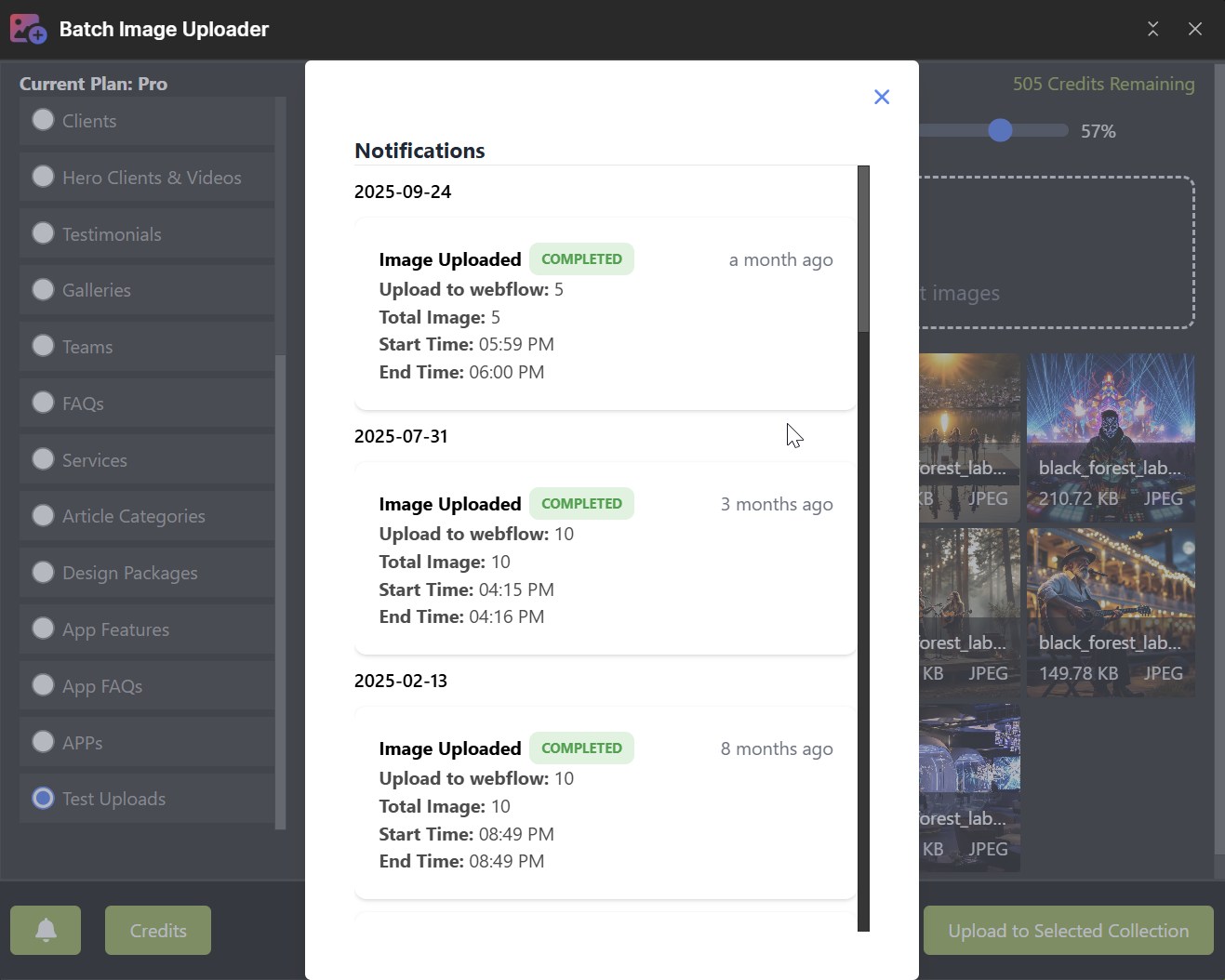
View a running history of all your upload batches with detailed logs showing completion status, number of images processed, and exact start and end times. Each notification provides a complete record of your batch operations, making it easy to track your workflow and verify successful uploads. Combined with email notifications, you'll always know when your images are ready in Webflow, even if you've closed the app and moved on to other tasks.
Contact us

get in touch